The Philippines’ national police also offers the clearance certification online, where traveling to a police station for a person is impossible. To get the clearance certificate, the standard process is scheduling the appointment online and physically visiting the police station for the certificate. In a few cases, PNP allows the online clearance certification for Filipino citizens. This Guide will help you understand who can obtain the certification online, what documents each category needs, how to apply step by step, and how long the application will take.
Eligibility for Philippine Clearance Certification Online
The online clearance certification is not for everyone. The online certification is only for those citizens who fall under any of the categories below:
OFWs: Overseas Filipino Workers (OFWs) and Filipinos living in other countries who cannot personally visit a Philippine police station and cannot return just for a clearance certification.
Bedridden Individuals: Applicants who have serious health conditions preventing them from traveling to a police station.
Petitioners (Probation/Bail): Individuals with ongoing court cases who need a clearance certificate for probation or bail applications.
Deceased Persons: A legal beneficiary or representative applying for a clearance certificate on behalf of a deceased person for estate settlement, legal proceedings, or government benefit claims.
Clearance Certification Requirements for Each Category
Filipino Citizen Working/Based in Another Country
Requirement:
- Selfie with Valid ID: A clear selfie photograph where you are visibly holding your active government ID next to your face.
- Passport bio page: Photo or scan showing your name, photo, passport number, and expiry date
- Immigration entry/exit stamps: Photos of passport pages showing the ENTRY/EXIT Stamp of the Bureau of Immigration
- Proof of foreign residency: Proof of residency outside the Philippines. You can provide the Company ID, Resident ID, or a copy of a visa.
- Philippine address proof: Valid government ID showing your last registered address in the Philippines
Bedridden
Requirements:
- Uploading a Selfie/Photo holding the valid government-issued ID or a Newspaper of the current date and date should be clearly visible.
- Barangay Health certificate or Medical Certificate from the attending physician.
- Valid ID or Barangay Residency Certificate
Petitioner (Applying For Probation/Bail)
Requirements:
- Uploading a Selfie/Photo holding the valid government-issued ID or a Newspaper of the current date and date should be clearly visible.
- Certificate Under Custody
- Valid ID or Barangay Residency Certificate
Deceased
Requirements:
- Selfie of Representative
- Proof of Relationship
- Death Certificate
- Valid ID of Deceased
Note for beneficiaries: You must provide a marriage certificate (if spouse) or birth certificate (if parent or child) to verify your relationship. Without these, your application will be rejected.
Step-by-Step Clearance Certification Application
Register and log in with the PNP Clearance. Check our guide on how to register for a police clearance.
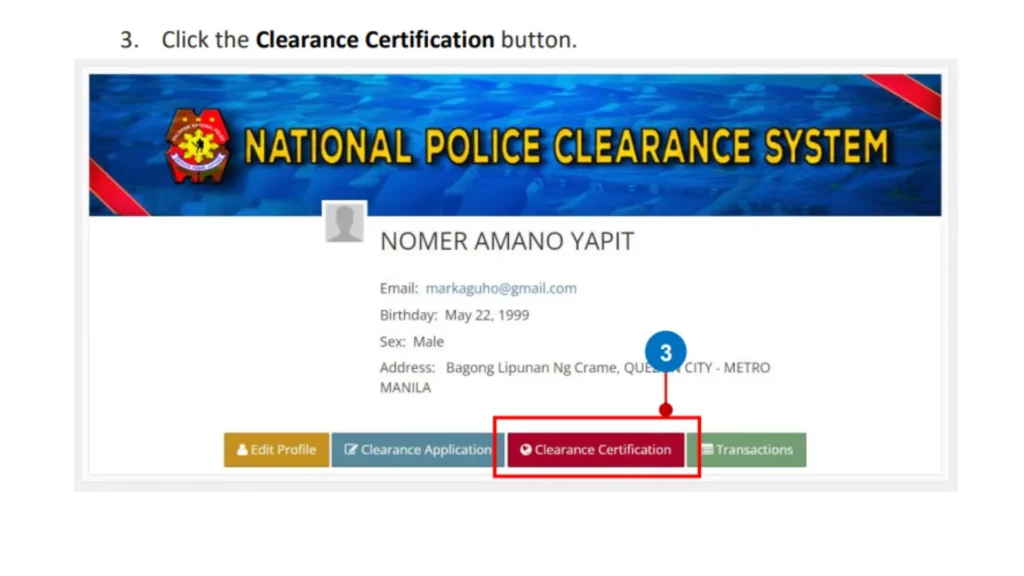
1. Click on the Clearance certification button on the profile page.
2. Select whether you are applying for certification as a Filipino citizen working/based in another country, Bedridden, a petitioner, or a deceased person.
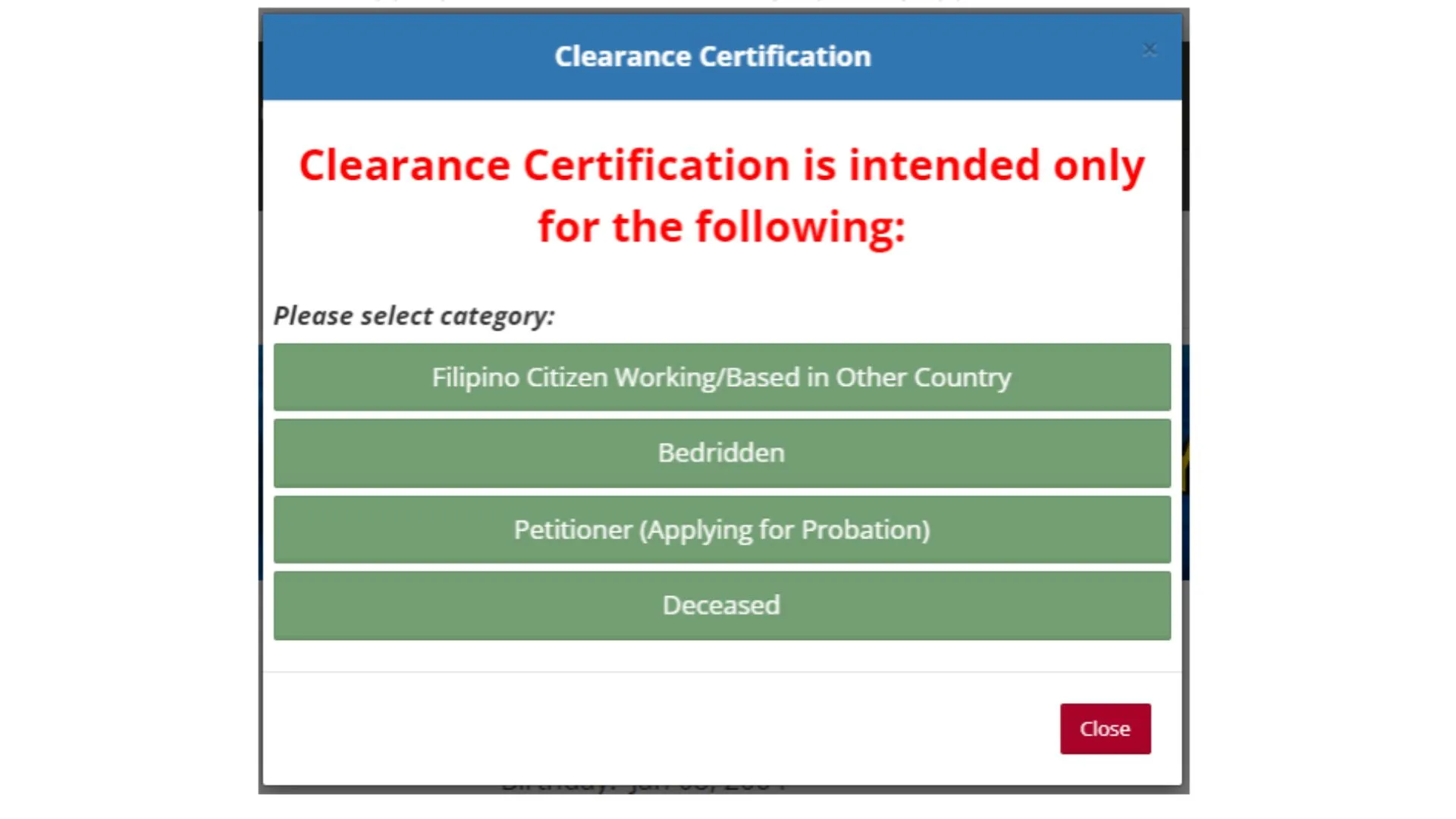
3. Each Category has specific requirements as given above. PNP requires you to read the requirements and notes before you click the “Apply” button.
4. Prepare the required document and fulfill the requirements as mentioned above, depending upon the certification category.
5. Enter the purpose and current address based abroad. The purpose and address will be on your certification as you enter, so make sure to double-check the spelling.
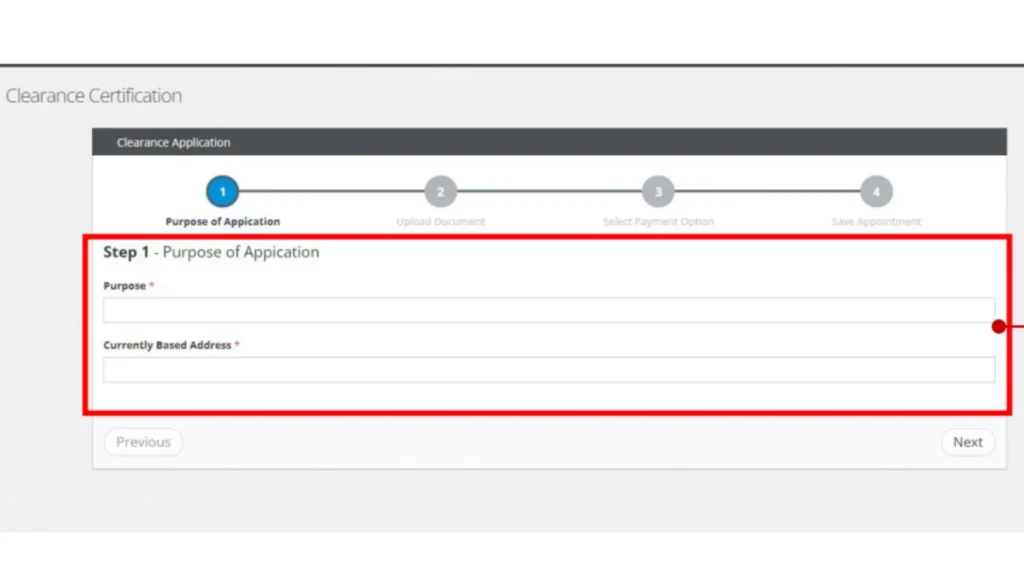
6. Upload the required documents as per your certification category and click “Next”.
7. Select the Landbank of the Philippines to pay the clearance fee and click “Next”.
8. Click the “Save Appointment” and click “Next”.
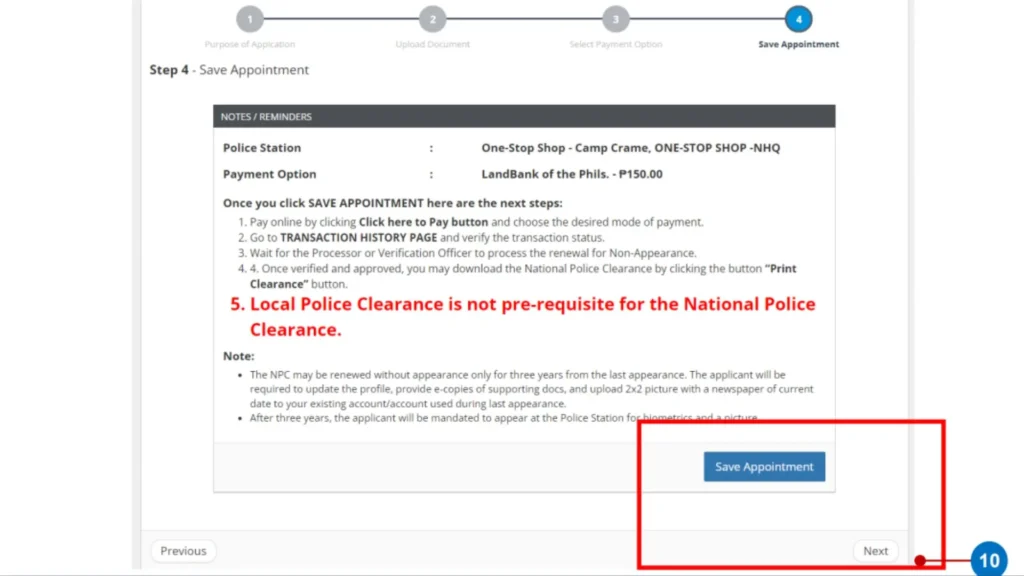
9. Once the appointment is saved, click on “Click here to pay” for the other payment options, like GCash or 7-Eleven. Once you have paid the fee, wait for the application to process. The officer from the police station will check the records.
10. If you are cleared and don’t have “Hit Status,” the officer from the police station will approve your clearance certification. Once the certification is approved, you can download your Nation police Clearance from your profile by clicking on the “Download your certification” button.
Difference Between Standard Application And Online Certification
| Standard Application | Online Certification | |
| Personal Appearance | The standard application requires an in-person visit to the police station. | No in-person visit required. |
| Clearance Verifications | Biometrics and photo capture at the police station. | Alternative documents to upload during the application for verification. |
| Processing Time | Same day (No Hit) or 3-15 days (Hit) | 5-10 working days |
| Application Method | Online registration and in-person visit for biometrics. | Online |
| Eligibility | Every Filipino is eligible to apply | Special cases only |
Clearance Certification Fees
The fee for the clearance certification is the same as the standard application, which is Php150 + Php10-30 transaction fee, depending on the payment method.
Conclusion
The PNP’s online clearance certification process provides a valuable service for Filipinos who cannot personally appear at police stations due to valid circumstances. Whether you’re an OFW working abroad, caring for a bedridden relative, navigating legal proceedings, or handling estate matters for a deceased loved one, this special process ensures you can obtain the necessary documentation.