Police Clearance Payment Methods | GCash, Landbank, And Others
Police Clearance payment is the most important part of a clearance certificate application. Understanding the available police clearance payment methods helps you avoid unnecessary stress and problems. Many applicants face delays because they choose the wrong payment channel, enter incorrect reference numbers, or pay through unsupported methods. A failed transaction can also lead to duplicate charges or an unpaid status in the system.
Today, applicants can pay through digital wallets like GCash, online banking services, over-the-counter outlets, and government partner channels linked to PNP payment systems. Each option works differently, and processing times may vary depending on the selected payment channel.
Before paying, always double-check the payment details shown in the portal. This small step can save time and prevent appointment delays.
Understanding How Police Clearance Payments Work
Understanding the available police clearance payment methods helps you avoid failed transactions and unnecessary waiting time.
Here is how the process usually works:
- Complete the online application form first.
Your details must be submitted before any payment request is created. - Receive a reference or transaction number.
The system automatically generates this after your application is reviewed for payment. - Choose from the available police clearance payment methods.
Depending on the system, applicants may use banks, e-wallets, online banking, or other approved payment channels PNP supports. - Complete the PNP payment through the selected channel.
Always double-check the reference number before confirming payment. - Wait for payment confirmation.
The application status updates once the payment is verified in the system. - Proceed with the next application steps.
After confirmation, you can continue with appointment scheduling or biometric capture.
Keeping your receipt or digital confirmation is important in case verification takes longer than expected.
Official Police Clearance Payment Channels in the Philippines
Knowing the available police clearance payment methods helps you avoid delays, failed transactions, or missed appointments.
The Philippine National Police supports different payment channels to give applicants more flexibility. Some people prefer digital wallets for fast payments, while others still use banks or over-the-counter centers. The best option usually depends on convenience, internet access, and available accounts.
Here’s a quick comparison of the most common payment channels PNP applicants use:
E-wallets
- Best for: Fast mobile payments
- Processing speed: Usually instant
- Requirement: Active mobile wallet account
Online banking
- Best for: Applicants using bank apps
- Processing speed: A few minutes to several hours
- Requirement: Online banking access
Over-the-counter payment centers
- Best for: Cash payments
- Processing speed: May take longer
- Requirement: Payment reference number
Bank branches
- Best for: Traditional banking users
- Processing speed: Same day or next business day
- Requirement: Valid payment reference
Before making any payment, double-check the reference number generated during your application. A wrong reference number can delay your police clearance processing.
E-Wallet Payment Options
Many applicants prefer e-wallets because they are fast and easy to use. You can pay directly from your phone without visiting a payment center.
Popular police clearance payment methods through e-wallets include:
- GCash for quick mobile payments
- Maya for digital wallet and online banking access
- Mobile payment apps linked to local banks
- QR-based payment options when available
GCash is one of the most commonly used options for PNP payment transactions because confirmation is often faster than manual payment channels. After payment, save your receipt or screenshot until your police clearance status updates successfully.
If the payment does not reflect immediately, wait for the confirmation period before attempting another transaction.
Bank and Online Banking Payments
Applicants who prefer banking services can also use online banking apps or bank payment systems for police clearance fees. This option is useful for people already using digital banking for bills and government payments.
Common payment channels PNP applicants use include:
- Land Bank of the Philippines online banking
- Mobile banking apps from local banks
- Internet banking portals
- Bills payment services connected to the clearance system
When paying the Landbank clearance fee or other bank-based payments, always keep the transaction reference number. Some banks process payments instantly, while others may take several hours before the system confirms the payment.
Avoid making duplicate payments while waiting for confirmation.
Please also check the official PNP Website for available payment options.
Over-the-Counter Payment Centers
Not everyone uses online banking or e-wallets. Physical payment centers are still available for applicants who prefer cash payments.
Common over-the-counter payment channels PNP applicants may use include:
- Convenience stores with bills payment services
- Authorized payment centers
- Bank branches accepting government payments
- Partner remittance outlets
Bring your payment reference number before visiting the payment center. Keep the printed receipt until your police clearance payment is fully verified.
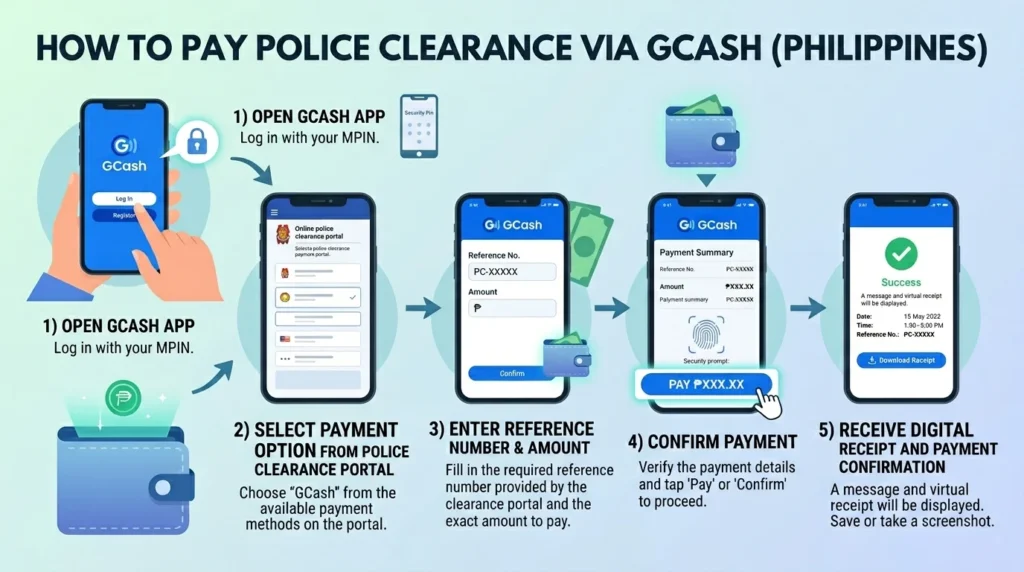
How to Pay Police Clearance Using GCash
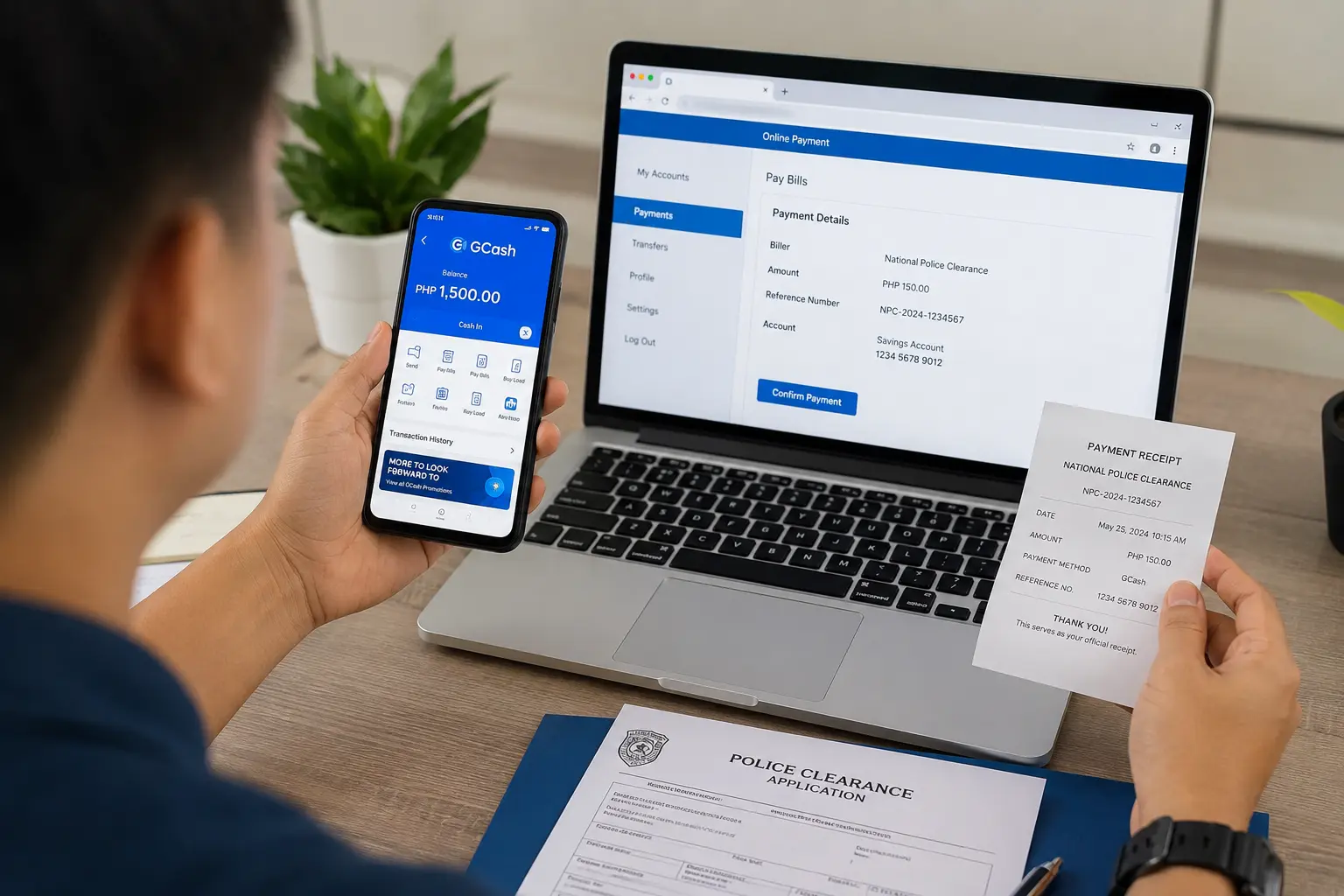
Paying for your police clearance online is one of the easiest parts of the process. Among the available police clearance payment methods, GCash is popular because it is fast, simple, and available anytime. You can complete the payment in just a few minutes using your phone.
Once you already have your reference number from the PNP system, follow these steps carefully to avoid delays in your PNP payment.
- Open your GCash app and log in to your account.
- Make sure you have enough balance to cover the police clearance fee and any small service charges.
- On the payment page from the police clearance portal, select the GCash option under available police clearance payment methods.
- Enter the required payment details exactly as shown:
- Reference number
- Registered mobile number
- Amount to pay
- Review the information before continuing. A wrong reference number can delay your police clearance verification.
- Confirm the payment in GCash.
- Wait for the confirmation message or receipt. You should also receive a payment confirmation from the PNP system after successful processing.
- Save a screenshot or copy of the transaction receipt for backup. This helps if there is a payment issue later.
GCash is useful for people who want a quick PNP payment without visiting a payment center. It is also helpful for applicants completing requirements from home.
Common GCash Payment Errors and Fixes
Small mistakes during GCash transactions can cause delays. Here are common problems and simple fixes when using this police clearance payment method:
- Payment failed
- Check your internet connection.
- Make sure your GCash account is fully verified.
- Insufficient balance
- Add enough funds before retrying the PNP payment.
- Include possible service fees.
- Pending transaction
- Wait a few minutes first.
- Avoid paying again immediately to prevent duplicate charges.
- Wrong reference number entered
- Contact PNP support or the payment help center.
- Keep your GCash receipt as proof.
- No payment confirmation received
- Check your SMS and email notifications.
- Log in again to the police clearance portal and verify payment status.
Paying Through Landbank and Other Banking Channels
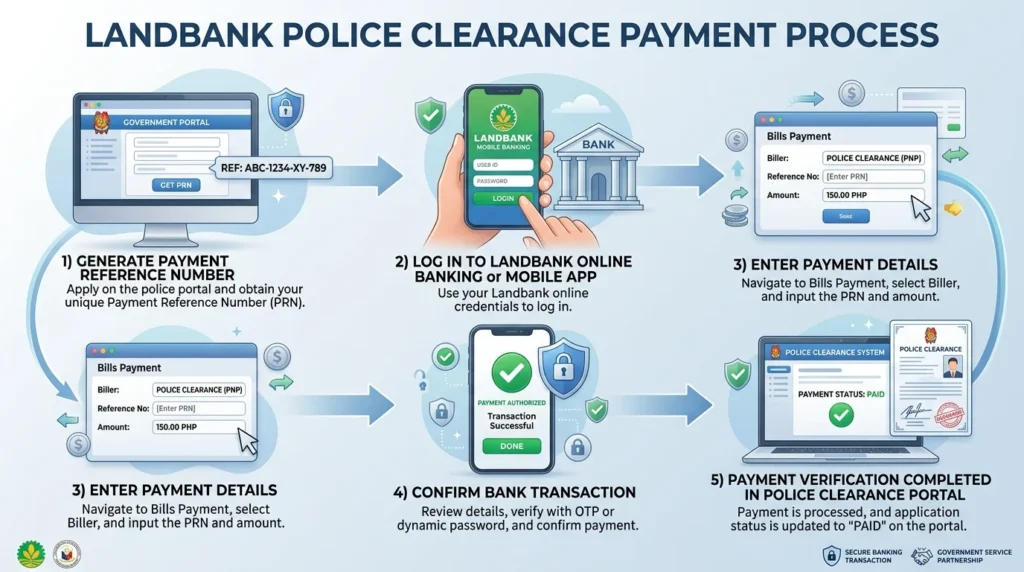
If you prefer banking payments, the police clearance payment process also supports Land Bank of the Philippines and other accredited banking channels. This option works well for applicants who use online banking apps, mobile wallets linked to banks, or over-the-counter bank services.
After generating your reference number in the police clearance system, choose your preferred payment channel PNP option. Many applicants use Landbank because it is widely available and directly connected to government payment systems.
You can usually pay through:
- Landbank online banking
- Landbank mobile banking
- ATM payments
- Over-the-counter bank payments
- Partner banking apps and digital banking services
Processing time is often fast for online payments. In many cases, the payment reflects within a few minutes. However, some bank transactions may take longer depending on system traffic or banking hours.
Applicants should also expect possible service charges or a small Landbank clearance fee depending on the payment method used. The fee varies by bank or platform.
Before leaving the payment page, always save:
- Transaction receipt
- Reference number
- Payment confirmation screenshot
These details help if verification problems happen later.
Landbank Payment Verification Process
After paying, log back into the police clearance portal and check your application status. If the payment was successful, the system usually changes from “Pending” to “Paid.”
You may also receive:
- Email confirmation
- SMS notification
- Bank transaction receipt
If the status does not update after several hours, wait a bit longer before making another payment. Some banking channels process transactions more slowly during weekends or heavy traffic periods.
Keep your receipt and Landbank clearance fee confirmation until your police clearance appointment is completed.
Police Clearance Fee Breakdown and Additional Charges
Before paying for your police clearance, it helps to know exactly what you are being charged for. Many applicants get confused when the final amount is slightly higher than the standard police clearance fee. In most cases, the extra amount comes from payment provider charges, not from the clearance itself.
Here’s a simple fees breakdown to help you avoid surprises during payment.
- Standard Police Clearance Fee: PHP 150
- Convenience Fee: PHP 10–30
The total amount is dependent on the payment method you choose. For example, paying through an e-wallet may include a small convenience fee, while over-the-counter centers sometimes add service charges.
Always review the total amount before confirming payment. This helps prevent failed transactions or payment disputes.
How Long Payment Confirmation Usually Takes
After paying your police clearance fee, the next step is waiting for payment confirmation. In most cases, confirmation is quick. But the exact time depends on the payment channels PNP applicants use.
Some payments update within minutes, while others may take several hours. Delays can also happen during weekends, holidays, or system maintenance.
| Payment Channel | Usual Confirmation Time |
|---|---|
| GCash | 5–30 minutes |
| Landbank | Within the same day |
| 7-Eleven | 1–24 hours |
| Bayad Center | 1–24 hours |
| Credit/Debit Card | Usually instant |
While waiting for your PNP payment confirmation:
- Do not pay again immediately
- Keep your reference number and receipt
- Check your email and account status regularly
- Wait at least 24 hours before reporting a delayed payment
If the payment still does not appear after the expected time, contact the payment provider or the official police clearance support team for assistance.
What to Do if Your Police Clearance Payment Fails
When using different police clearance payment methods, delays sometimes happen because of internet issues, banking errors, or incomplete transactions. This is common with digital wallets like GCash and some online banking services.
Here’s what you should do based on your situation:
- Payment shows as “pending”
- Wait at least 24 hours before trying again.
- Check your email, SMS, or transaction history for updates.
- Avoid making another payment immediately to prevent duplicate charges.
- Money was deducted but no confirmation appeared
- Take screenshots of:
- Transaction reference number
- Payment date and time
- Amount paid
- Save your receipt or confirmation email.
- Contact the official support team for your PNP payment concern.
- Take screenshots of:
- You accidentally paid twice
- Do not create another application.
- Prepare both payment references and screenshots.
- Request verification before asking for reprocessing or refund.
- GCash payment failed
- Check if your wallet balance was enough, including service fees.
- Confirm your internet connection was stable during checkout.
- Review the app notifications for failed or reversed transactions.
- Reference number not recognized
- Double-check that you entered the correct payment details.
- Refresh your application dashboard after a few minutes.
- If the issue continues, contact support with proof of payment.
Keeping digital and printed copies of your receipts is important when using police clearance payment methods. These records help speed up verification if problems happen later.
Refunds and Reprocessing Requests
Refunds or payment corrections may be possible if your PNP payment was duplicated, posted incorrectly, or remained unverified for a long period. In most cases, applicants need to provide:
- Valid ID
- Payment receipt
- Transaction reference number
- Screenshots of the failed or duplicate payment
- Registered email or application details
Processing times can vary depending on the payment channel used. Keep copies of all documents until the issue is fully resolved.
Tips for Choosing the Best Payment Method
Not all police clearance payment methods work the same way. The best option depends on your location, preferred payment style, and how quickly you want confirmation.
Here are some quick tips before choosing:
- Use GCash if you want faster mobile payments and instant notifications.
- Choose bank payments if you already use online banking regularly.
- Over-the-counter options are helpful for applicants without digital wallets.
- Always check the total amount, including the Landbank clearance fee or service charges.
- Pick the method that is easiest for you to access consistently.
Choosing the right police clearance payment methods can save time, reduce delays, and make your application process smoother.